Stop re-explaining yesterday's work.
Save project decisions in scoped local memory. A later session from the same user and connected coding agent can recall them with their history attached. Start free locally; Pro adds hosted Analytics, scheduled upkeep, and optional Cloud Sync.
No card required · Trial starts after email verification · $10/month or $100/year when you subscribe.
A local memory engine. Three reasons to add Pro.
The complete local engine stays free. Pro adds hosted tools for understanding and maintaining the memory you choose to connect.
- See what needs attention
- Review memory growth, retention, and decay forecasts in Analytics. Use the results to decide what to revisit; a new workspace may need more history before those signals are useful.
- Schedule memory upkeep
- Choose when Auto Consolidation and Auto Dreaming run. Managed automation produces proposals for review before local changes; manual consolidation remains part of the free core.
- Choose hosted sync
- Connect an eligible local workspace to Cloud Sync. You hold the workspace encryption key. Sync and readable managed processing require separate choices.
Use the trial on a real workspace.
Start with project memory you already use. The goal is a completed result that helps you decide what needs attention.
- Verify your email and connect your installation. Your seven-day trial starts after verification. Run the current connect command from your account on your own machine.
- Choose your workspace and data boundaries. For Cloud Sync, configure and securely back up your user-held encryption key. Review managed-processing consent separately before using Analytics or automation.
- Inspect a completed Pro result. Review Analytics for a useful growth, retention, or decay signal. If there is too little history, keep that limitation visible. Schedule automation only when you choose it.
New to Engraphis? Set up the free local core first and try one convention across two sessions. Already using it? Connect your existing workspace. Get private account help if setup gets in the way.
Choose how you want to run memory.
Choose Free for local memory you operate yourself, Pro for hosted memory-health views and scheduled upkeep, or Team for account governance. The Team offer and its availability limits are listed below.
Pro
For one owner reviewing memory health and scheduling upkeep
- Everything in Community
- Analytics: growth, retention, and decay forecasts
- Auto Consolidation and Auto Dreaming
- Optional hosted Cloud Sync
Free
For running and managing memory locally
- The complete recall engine, unlimited on your machine
- MCP server, dashboard with Memory Inspector, CLI, library
- Yours under Apache-2.0, free forever
Team
For managing members and scoped account access
- Everything in Pro
- Multi-user admin, member, and viewer roles
- Seat management and per-user audit history
- Scoped agent and sync credentials
- Optional sync for eligible workspaces
- Confirm current Team access before use
Start a 7-day Pro or 14-day Team trial after confirming your email; no card is required. Team trials include 5 trial seats. Stripe handles paid checkout inside the authenticated account portal, and hosted paid features use online authorization. Free local use remains offline-capable and free forever.
Shared workgroup memory: One secure memory shared across teammates and coding agents is a longer-term need, separate from today's Team account features.
The Team offer covers account roles, named seats, scoped credentials, organization audit history, and optional sync for eligible workspaces. Shared hosted Team memory and hosted MCP are not yet available. Check Team availability before starting.
Manage account billing, recover access by email, or use private account support. Resend verification from your account page.
See what your agent knows and why
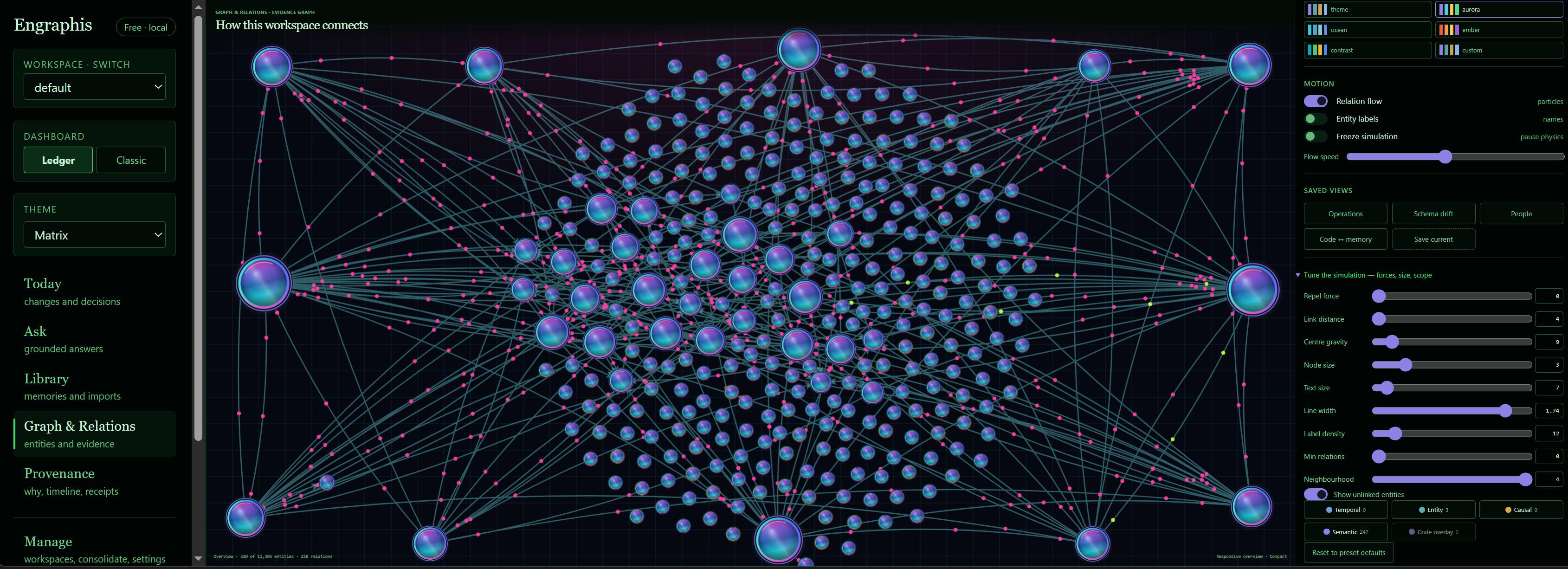
Related memories form a local graph, so you can inspect connections, history, and recall rationale without sending data away.
The browser demo uses seeded sample data. It shows local inspection workflows, not a connected Pro account.
Recall context with the same agent
A later session from the same user and connected coding agent can recall saved project memory with its scope and history.
Bound memory to the work
Recall can stay scoped to a workspace, repository, and session instead of becoming one undifferentiated store.
Trace content and history
Inspect recalled memory, its connections, its history, and the rationale behind recall.
Set up the free local core
Connect a coding agent, open the local dashboard, or use the same memory service directly from Python.
Connect your coding agent
Inspect memory visually
Embed Engraphis in an application
Published setup recipes cover Claude Code, Cline, Codex, Cursor, Windsurf, and Zed. Start with the agent connection guide and your client's current configuration instructions. The command above is the Claude Code recipe; configuration recipes are not a claim of current client certification.
The installed service uses a local embedding model (approximately 80 MB on first download), with a deterministic offline fallback. The core Python factory defaults to the offline embedder.
Evaluate memory without giving up control
Use the same questions for every option: where context lives, how agents integrate, what operators can inspect, and what changes when a team shares memory.
Memory tools your coding agent can use
The default Smart profile exposes 9 Smart MCP tools with advanced discovery for recall, governance, code awareness, and session lifecycle, with workspace, repository, and session scope. Start it with engraphis-mcp. The optional Classic profile exposes 35 direct tools through engraphis-mcp-classic. See the shipped MCP guide.
| Category | Tool | What it does |
|---|---|---|
| Read | engraphis_conflict_review | List pending/quarantined/conflicting memories |
| Read | engraphis_discover_actions | Discover an advanced Engraphis capability |
| Action | engraphis_execute_action | Execute a discovered stateful action |
| Read | engraphis_execute_read | Execute a discovered read action |
| Read | engraphis_get_memory | Read one memory's governed record |
| Action | engraphis_recall_context | Recall compact project context |
| Action | engraphis_remember | Remember a durable fact |
| Action | engraphis_session | Start or end a memory session |
| Action | engraphis_update_memory | Edit a memory's metadata fields |
Configure it locally
Run engraphis-init to write owner-private ~/.engraphis/config.env, or set process environment variables. Engraphis does not search the working directory for a .env file. Set ENGRAPHIS_ENV_FILE to an absolute path to use another trusted config file.
| Env var | Default | Description |
|---|---|---|
ENGRAPHIS_DB_PATH | Per-user data directory | Installed database location below; ordinary relative overrides resolve from the trusted config directory |
ENGRAPHIS_HOST | 127.0.0.1 | Server bind address |
ENGRAPHIS_PORT | 8700 | Dashboard port |
ENGRAPHIS_API_TOKEN | Not set | Optional bearer token for the local REST API |
ENGRAPHIS_EMBED_MODEL | sentence-transformers/all-MiniLM-L6-v2 | Local sentence-transformers model for the installed service |
ENGRAPHIS_LLM_PROVIDER | openai | Provider for optional LLM features |
ENGRAPHIS_LLM_API_KEY | Not set | Provider key for optional LLM features |
Installed database defaults: Windows %LOCALAPPDATA%\engraphis\engraphis.db (or ~\AppData\Local\engraphis\engraphis.db); macOS ~/Library/Application Support/engraphis/engraphis.db; Linux $XDG_DATA_HOME/engraphis/engraphis.db (or ~/.local/share/engraphis/engraphis.db). Source checkouts use <repository>/engraphis.db.
The local core is free and requires no license key. Pro and Team use the authenticated account portal and online authorization for hosted features.
Find your first useful Pro result.
Try Pro for seven days after email verification. No card required. $10/month or $100/year when you subscribe.